Fulfillment strategy
A Shopify Fulfillment Workflow for China-Based Inventory
Build a Shopify fulfillment workflow for China inventory with SKU mapping, location checks, order release, split orders, cancellations and a test checklist.
By BiaoJu Editorial Team · · 10 minute read
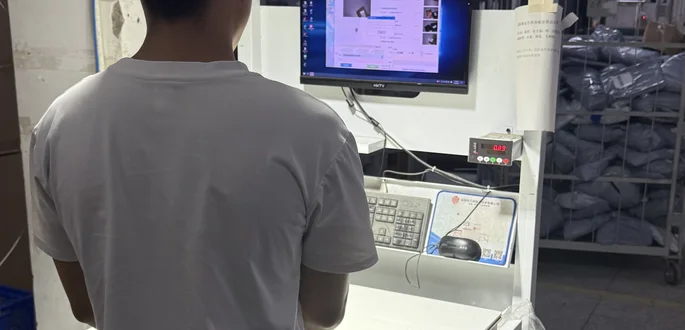
A dependable Shopify fulfillment workflow for China-based inventory needs five controls: unambiguous SKUs, stock recorded at the correct location, an explicit order-release check, confirmed warehouse acknowledgment, and fulfillment records that match the parcels actually dispatched. Start with those controls before adding automation. This workflow can operate through a controlled manual handoff or a separately verified integration; the operating design below does not depend on a particular app or automatic inventory connection.
Build the SKU and location map
A product title is a poor picking instruction. “Black organizer” might describe two sizes, several packaging versions and a replacement item that looks nearly identical. Give each sellable variant a stable identifier, then map that identifier to the physical warehouse item.
Shopify recommends unique, consistent SKUs for effective tracking and reporting, and warns that duplicate SKUs can cause integration and inventory problems. Map supplier identifiers to your store variants explicitly, rather than assuming that an existing warehouse label already uses the same identifier. Shopify SKU guidance
Your item master should connect the Shopify variant, SKU, warehouse identifier, supplier code, unit of sale and packaging instruction. One row means one defined picking unit. If you sell a two-piece set, establish whether the warehouse holds a preassembled set or must pick two component units.
| Store SKU | Customer buys | Warehouse instruction | Check before release |
|---|---|---|---|
| ORG-BLK-S | One small black organizer | Pick one small unit | Size and color match |
| ORG-BLK-L | One large black organizer | Pick one large unit | Do not substitute small |
| ORG-SET-2 | One two-piece set | Follow the approved set mapping | Components and packaging confirmed |
These identifiers are fictional. The important feature is the mapping, not the naming format. When a supplier changes a product, review whether the existing SKU still describes an interchangeable item. Keep retired mappings available for returns and old orders.
Map warehouse stock to the Shopify location that actually holds it. Distinguish a China warehouse from a US returns address, supplier premises and incoming shipments. A location name should identify responsibility clearly enough that support can find the correct operator.
Shopify assigns online orders using location inventory and configured routing rules; split fulfillment can occur when one location cannot fulfill the order. Check routing and shipping profiles against your physical model rather than relying on the first plausible location shown. Shopify location fulfillment documentation
Separate physical stock from sellable inventory
Receiving is a verification step. Compare the advance shipment notice with counted units, check the correct variants and identify damaged or unapproved stock. A supplier's dispatch message establishes incoming goods, not inventory already available for customer orders.
Shopify distinguishes On hand, Available, Committed, Unavailable and Incoming inventory. On hand comprises Available, Committed and Unavailable quantities. Incoming quantities are separate and are not available until received into the appropriate state. Shopify inventory states
For a fictional SKU at one location, suppose there are 40 units physically on hand, eight committed to orders and five unavailable for inspection. The sellable quantity is 40 − 8 − 5 = 27. Another 20 units on the way from the supplier are incoming; they do not increase those 27 sellable units.
Build a reconciliation around that arithmetic. Compare the same SKU, location and timestamp across the store and warehouse records. Identify reservations, holds, returns awaiting inspection and adjustments before calling a difference an error. Counts taken at different times may simply include different orders.
Assign one person or system to own each quantity update. If a warehouse report already accounts for shipped orders, importing its number and then subtracting those same orders again creates a false shortage. Conversely, adding a canceled order back twice creates stock you cannot pick.
For manual operation, use a scheduled reconciliation and a documented adjustment log: old quantity, new quantity, reason, supporting count and owner. Select the frequency according to stock movement and acceptable oversell risk. Faster-selling or scarce SKUs need tighter checks; a daily file is not equivalent to continuous synchronization.
Before using any integration, test how it treats reservations, location changes and retry messages. Agree whether it sends physical counts, sellable quantities or adjustments. Until that meaning is verified, treat the connection as an unresolved operating dependency.
Release an order through one controlled gate
Payment, fulfillment status and warehouse readiness are different decisions. An order visible in Shopify does not by itself authorize the warehouse to dispatch every line.
Create one release queue with an owner. For each order, review the payment state under your chosen policy, fraud-review outcome, deliverable address, product eligibility, confirmed inventory and customer service instructions. Do not bypass unresolved platform holds simply to clear the queue.
Shopify supports manual fulfillment holds and releases; a fulfillment can have multiple holds, including those placed by a service. Releasing one does not establish that every remaining hold has cleared. Shopify fulfillment holds
Use a separate operational sequence: reviewed, released, acknowledged, picked, packed and handed over. These are proposed warehouse control labels, not claims about Shopify's built-in status names. Map them to your actual platform records and partner process.
The released instruction needs a version. Include the store identifier, order ID, line-item identifiers, quantities, location, full address, packing instructions and release time with timezone. Ask the warehouse to acknowledge the exact version, then reject accidental resubmission of an already acknowledged instruction.
Set a cutoff timezone and a rule for late edits. For example, an address change after release should create a stop-and-review request, not quietly overwrite the warehouse's picking file. Confirm which version has reached the packing bench before resuming work.
Close each batch with three totals: orders released, orders acknowledged and orders held or rejected. Every difference needs a named exception. A large batch that exported successfully can still contain an order that the warehouse did not accept.
Decide what happens to split orders
Splits can be intentional or accidental. One order might need two locations, two services, or separate dispatches because one item is unavailable. Decide the customer experience before the warehouse decides the packing sequence.
| Situation | Proposed decision rule | Required record |
|---|---|---|
| All items available at one location | Keep together when eligible | One instruction with all line quantities |
| One item unavailable | Follow the agreed wait, split or refund policy | Held quantity and customer decision |
| Items require different services | Verify eligibility before separating | Service assigned to each parcel |
| Multiple locations needed | Confirm additional cost and promise | Location, quantity and parcel mapping |
Shopify allows a fulfillment to be split by line items and quantities. Its tools also support changing the location for eligible unfulfilled orders. Those platform actions need to agree with the warehouse instructions already issued. Shopify individual fulfillment guidance
Give each dispatch its own reference. Record which line quantities belong in each parcel and which remain unfulfilled. Never mark the entire order dispatched because the first parcel has a label.
For a fictional three-unit order, if parcel A contains two units and parcel B will contain one, the sum of acknowledged dispatch quantities must remain three. A retry of parcel A's update must not add two more units. Use that simple case to test any manual spreadsheet or connector.
Customer notifications should explain how many parcels to expect and where the missing item stands. “Partially fulfilled” is an internal platform description; “two items are dispatched, and the remaining item awaits stock” is useful buyer information when supported by the actual records.
Handle cancellations before changing stock
A cancellation request creates a race against picking and handover. Identify the parcel's physical state before deciding what can still be stopped. Establish one urgent contact channel for released orders and require a response that identifies the order, affected quantities and outcome.
Shopify notes that third-party fulfillment processing may require cancellation through the provider's system first. It also has restrictions around partially fulfilled orders and warns about refund behavior during bulk cancellation. Check the individual order and current documentation before acting. Shopify cancellation guidance
In the operating procedure, distinguish four outcomes: canceled before picking, removed from packing, already handed over, or physical state unconfirmed. “Request sent” belongs in the last category until the warehouse responds. Do not promise a successful stop based only on a status change in the store.
If the warehouse confirms that goods remain available, reconcile the reservation and stock once. If a parcel has left, use the applicable intercept, return or customer-resolution process; changing a fulfillment record does not retrieve it.
Keep refund and inventory decisions separate. A refunded customer may still have an outbound parcel. A returned product may require inspection before becoming sellable. Record each action with its own evidence and owner so that support can explain the financial and physical outcomes independently.
Return accurate fulfillment and tracking records
Require a dispatch acknowledgment with actual SKU quantities, parcel reference, service, tracking number and handover evidence. Match it to the latest released instruction before updating the store. Quarantine mismatches instead of guessing which order a tracking number belongs to.
Choose the tracking carrier and link carefully. Test that the buyer reaches the intended parcel, and distinguish an early international reference from a later delivery-partner reference. Preserve the relationship between them; replacing one without explanation can make a valid shipment appear to vanish.
A label-created event can be useful information, but present it as preparation if physical handover has not occurred. Set the notification point deliberately and test what Shopify emails say in your configuration.
Use a daily exception view for missing tracking, invalid links, duplicate parcel references, short shipments and orders that have exceeded the agreed processing checkpoint. Review those records alongside the warehouse acknowledgment log. A clean “fulfilled” count is insufficient if the dispatched quantities do not reconcile.
For shipment-specific planning, BiaoJu's Shopify fulfillment service page provides a starting point. Confirm the actual data-transfer method, permissions, acknowledgment format and exception ownership for your arrangement.
Copy the handoff template and run the test checklist
Fulfillment instruction
Store / order ID / instruction version:
Release timestamp and timezone:
Shopify location / physical warehouse:
Line ID / store SKU / warehouse SKU / quantity:
Recipient and verified delivery address:
Approved service / product eligibility check:
Packing, insert and bundle instructions:
Hold or cancellation contact:
Warehouse acknowledgment / accepted version:
Parcel reference / actual dispatched quantities:
Tracking number / carrier / tracking link:
Physical handover evidence and time:
Remaining quantities / exception owner:
Test the workflow with controlled orders before sending a live batch. Prevent test instructions from triggering real dispatches unless you have deliberately arranged a shipment test.
| Test | Pass condition |
|---|---|
| Two similar variants | Warehouse picks the correct SKU and packaging |
| Insufficient sellable stock | Order follows the chosen hold or split rule |
| Stock at the wrong location | Routing is corrected before release |
| An active fulfillment hold | Warehouse receives no dispatch authorization |
| Address edit after release | Previous instruction is stopped or explicitly superseded |
| Partial dispatch | Only dispatched quantities receive the matching tracking |
| Duplicate instruction or update | No duplicate picking, stock movement or notification |
| Cancellation during packing | Warehouse acknowledgment determines the next action |
| Unknown tracking carrier | Buyer receives a working, verified link |
| Returned damaged unit | Unit remains unavailable pending the agreed review |
Record the expected result and observed result for each test. Give failures an owner and repeat only the affected scenario after correction. Then reconcile the first live batch order by order before expanding volume.
Frequently asked questions
Can I use a China warehouse without a Shopify app?
Yes, a controlled manual handoff can support the operational process. Confirm who transfers orders, updates inventory and returns fulfillment records. An app should be evaluated against those same responsibilities rather than assumed to solve them.
Should supplier stock be available in my store?
Only according to a deliberately defined selling and replenishment policy. Supplier-reported stock is not warehouse-received stock. Record its readiness and avoid presenting an unverified incoming quantity as immediately available for dispatch.
What prevents duplicate fulfillment?
A stable order reference, instruction version, acknowledged dispatch record and duplicate checks. Test both repeat submissions and repeat responses; a warehouse and store can each process retries differently.
Can canceling in Shopify stop a parcel already handed over?
Do not rely on that. Confirm the physical stage and the fulfillment partner's cancellation process. The financial record, fulfillment record and physical parcel each require an appropriate action.
What should I confirm with BiaoJu before onboarding?
Confirm SKU mapping, receiving checks, location records, release cutoffs, data transfer, packing, tracking, cancellations and returns. Request a controlled test and written responsibilities for every handoff.
Bring your SKU list, stock locations, expected order volume and current Shopify process when you Chat on WhatsApp. Use the pricing page to prepare questions about handling and shipment costs, and agree the operating workflow before authorizing routine dispatches.
Sources and further reading.
Published Oct 15, 2026. Source references reviewed Oct 15, 2026. Confirm current terms for the actual shipment.
Keep the shipment in context.

Delivery & tracking
Shipping from China to the USA: How to Set Realistic Delivery Promises
Set realistic China-to-USA delivery estimates with shipment clocks, P50 and P80, unfinished parcels, business-day calendars and customer update templates.
· 10 min read
Delivery & tracking
Why Tracking Stops Updating: A Cross-Border Shipping Troubleshooting Guide
Diagnose stalled China shipping tracking through labels, first scans, handoffs, customs and delivery exceptions, with escalation and customer update templates.
· 10 min read

Fulfillment strategy
China Direct Shipping vs. a US 3PL: Which Model Fits Your Shopify Brand?
Compare China direct shipping and a US 3PL with a Shopify cost model, inventory exposure, routing checks, and a practical pilot before committing stock.
· 12 min read
Turn the checklist into a conversation.
Message BiaoJu with your destination and shipping question. We will identify the information needed for a shipment-specific review.
Chat on WhatsApp